Claude Code DISABLE_TELEMETRY: What It Breaks and How to Fix It
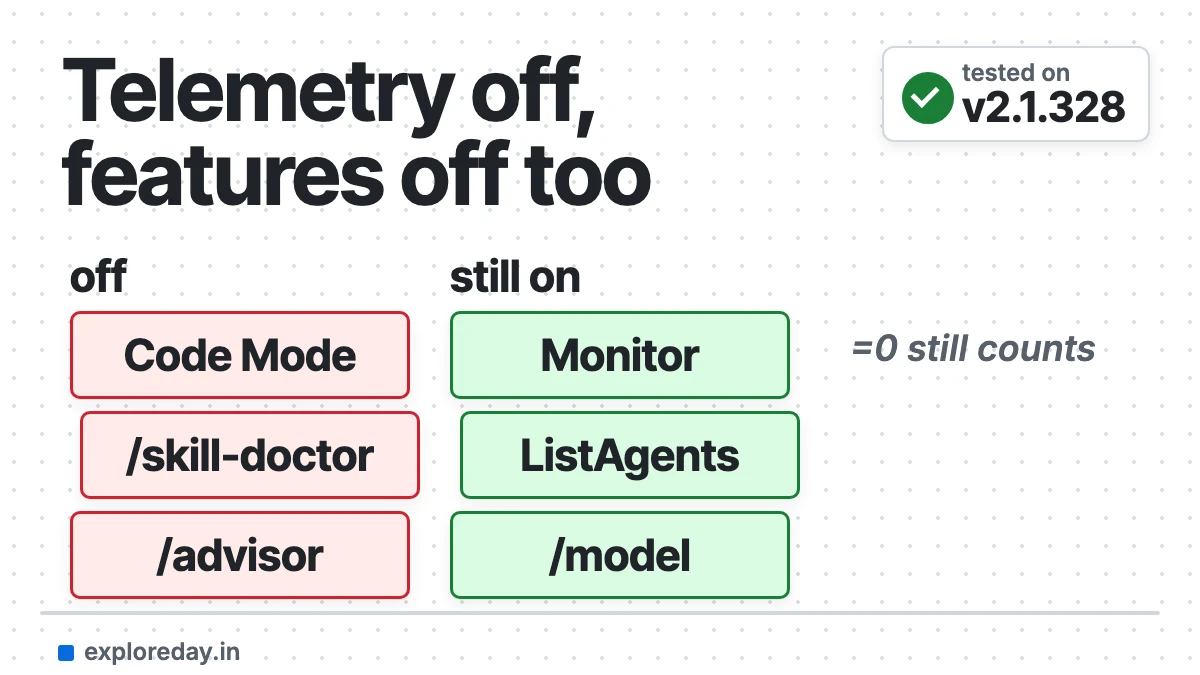
Claude Code DISABLE_TELEMETRY does more than stop usage metrics. It also stops Claude Code from downloading its feature flags, so features that depend on a flag switch off. In my test on v2.1.328, it blocked Code Mode, removed a tool and changed the /model list.
Quick answer: If a feature vanished after you set DISABLE_TELEMETRY, remove the variable completely. Setting it to 0 doesn’t work. To send less data without losing features, set only DISABLE_ERROR_REPORTING=1.
Tested on: Claude Code 2.1.328, macOS (Apple Silicon), Claude Max plan, 19 November 2026. I started Claude Code five times with different telemetry variables and copied the start screen, /model list, /status and tool list from each run. What I couldn’t test here comes from the official docs and GitHub issues linked below. Drafted with AI assistance (Claude).
Fix what DISABLE_TELEMETRY turned off in 5 steps
- Check if it’s set: run
/statusin Claude Code. A Features row says whenDISABLE_TELEMETRYis turning features off. - Find where it’s set: run the two commands below in your project folder.
- Remove it, don’t set it to 0: delete the line or the
enventry. Even0orfalsestill turns it on. - Want to send less data? Use
DISABLE_ERROR_REPORTING=1instead. It keeps feature flags working. - Start a new session and run
/statusagain. Shell changes only apply whenclaudestarts.
env | grep -E "DISABLE_TELEMETRY|DO_NOT_TRACK|NONESSENTIAL_TRAFFIC|DISABLE_FEATURE_FLAGS"
grep -n -E "DISABLE_TELEMETRY|DO_NOT_TRACK" ~/.zshrc ~/.bashrc ~/.profile ~/.claude/settings.json .claude/settings.json .claude/settings.local.json "/Library/Application Support/ClaudeCode/managed-settings.json" 2>/dev/null
No output means it isn’t set in those places. On Linux the managed file is /etc/claude-code/managed-settings.json. On Windows it’s C:\Program Files\ClaudeCode\managed-settings.json.
Also check your IDE’s launch settings, a dev container, or a .envrc file. An admin can also push the variable to you through server-managed settings.
What does DISABLE_TELEMETRY do in Claude Code?
DISABLE_TELEMETRY opts you out of Claude Code’s usage metrics: latency, reliability and usage patterns. The data usage docs say these metrics never include your code, prompts or file paths.
It also stops error reports and the “How is Claude doing?” surveys. And it turns off feature-flag fetching. Claude Code switches some features on with flags it downloads from Anthropic.
Without those flags, each one falls back to its built-in default, which is often “off”. The env-vars docs list this, but it’s easy to miss. Bug #108726 asks for the variable to stop analytics and nothing else.
What breaks when DISABLE_TELEMETRY is set?
Flag-gated features stop working, and Claude Code mostly doesn’t warn you. Here is what I saw with telemetry on and with DISABLE_TELEMETRY=1, same Mac and same account.
| Feature | Telemetry on | DISABLE_TELEMETRY=1 | How I know |
|---|---|---|---|
| Code Mode | On | Blocked at start | Tested |
/model picker |
Full list with “More models” | Short fallback list | Tested |
| PushNotification tool | Present | Missing | Tested |
| Monitor and ListAgents tools | Present | Present | Tested |
/advisor, /import, /skill-doctor, /ultrareview |
Work | Off | Named by /status |
| Skills and plugins synced from claude.ai | Sync | Don’t sync | Docs |
| MCP tasks, artifact comments | Work | Off | Docs |
| Remote Control | Works | Works, but no auto-connect | Docs |
Channels (--channels) |
Work | “Not currently available” | User report |
Code Mode tells you why at the top of the session. This is the exact line from my run:
⚠ Code Mode (experimental) isn't available: it needs settings that Claude Code downloads from Anthropic, and this session doesn't download them
  (DISABLE_TELEMETRY, DO_NOT_TRACK, CLAUDE_CODE_DISABLE_NONESSENTIAL_TRAFFIC or CLAUDE_CODE_DISABLE_FEATURE_FLAGS turns that off). Starting with the
  ordinary tools.
And /status shows a Features row (added in v2.1.326):
Features:          some aren't available while DISABLE_TELEMETRY is set, such as /advisor, /import, /skill-doctor, /ultrareview:
                   https://code.claude.com/docs/en/env-vars#features-that-need-feature-flag-fetching
An older report no longer matches v2.1.328. In #86171 the Monitor and ListAgents tools vanished, but both were there in my runs. The only tool missing was PushNotification.
Remote Control still works with only DISABLE_TELEMETRY set, on v2.1.283 or later. But sessions don’t auto-connect, and it’s off if your organization requires Trusted Devices (Remote Control docs).
Channels I couldn’t test, because they need a Discord or Telegram bot. In #36460, one user fixed “Channels are not currently available” by unsetting DISABLE_TELEMETRY.
Why is Fable 5.2 missing from /model with DISABLE_TELEMETRY?
With telemetry off, /model shows a fallback list, not the fresh list from Anthropic. Its “Fable” row comes from a cache in ~/.claude.json called additionalModelOptionsCache. If that cache is old, the row still says Fable 5.1.
That’s what #108726 and #108955 report on v2.1.322. On my Mac the cache already said Fable 5.2, so I didn’t get the bug. But the list still changed:
# Telemetry on (fresh list)
1. Default (recommended)  Opus 5.5 · Best for everyday, complex tasks
2. Opus 5.5               For complex work and everyday tasks
3. Fable 5.2              For your toughest challenges
4. Sonnet 5.5             Most efficient for simpler tasks
5. Haiku 5.5              Fastest for quick answers
▸  More models

# DISABLE_TELEMETRY=1 (fallback list, no "More models")
1. Default (recommended)  Opus 5.5 · Best for everyday, complex tasks
2. Opus                   Opus 5.5 · Best for everyday, complex tasks
3. Fable                  Fable 5.2 · Most capable for your hardest and longest-running tasks
4. Sonnet                 Sonnet 5.5 · Efficient for routine tasks
5. Haiku                  Haiku 5.5 · Fastest for quick answers
The debug log (claude --debug-file log.txt) shows the switch. With telemetry on it printed [servedCatalog] fetch (org) ok: 13 rows. With DISABLE_TELEMETRY=1 it printed [servedCatalog] off (flag).
Fix: remove DISABLE_TELEMETRY, or pick the model by its full name with /model claude-fable-5-2. Reporters in both issues say the full name works. I didn’t run it, because it would change my saved default model.
A custom ANTHROPIC_BASE_URL, such as an LLM gateway, can cause the same symptom. A comment in #108955 shows [servedCatalog] off (not_first_party) in that case.
Why doesn’t DISABLE_TELEMETRY=0 turn telemetry back on?
Claude Code only checks whether the variable is set. Any non-empty value, including 0 and false, turns telemetry and feature flags off. My run with DISABLE_TELEMETRY=0 printed the same “Code Mode isn’t available” line as the run with 1.
DISABLE_ERROR_REPORTING and CLAUDE_CODE_DISABLE_NONESSENTIAL_TRAFFIC work the same way. DO_NOT_TRACK is the exception: per the env-vars docs, DO_NOT_TRACK=0 leaves telemetry on. DO_NOT_TRACK=1 blocked Code Mode in my test.
If your shell sets the variable and you can’t change it, try an empty value in your settings file. The docs say an empty value counts as unset for these variables. I didn’t test this override:
{
  "env": {
    "DISABLE_TELEMETRY": ""
  }
}
How do I send less data and keep the features?
Set only DISABLE_ERROR_REPORTING=1. It stops crash and error reports but still downloads feature flags. In my test, Code Mode stayed on and /model showed the full list.
| Variable | What it stops | Feature flags |
|---|---|---|
DISABLE_ERROR_REPORTING=1 |
Error reports | Still on (tested) |
DISABLE_TELEMETRY or DO_NOT_TRACK=1 |
Metrics, error reports, surveys | Off (tested) |
CLAUDE_CODE_DISABLE_FEATURE_FLAGS=1 |
Nothing; telemetry stays on | Off |
CLAUDE_CODE_DISABLE_NONESSENTIAL_TRAFFIC |
Metrics, errors, auto-updates, /feedback, more |
Off |
My pick for a solo developer: leave metrics on, or set only DISABLE_ERROR_REPORTING=1. Metrics don’t include code, prompts or file paths. If your company requires telemetry off, accept that flag-gated features won’t work.
Admins: turning telemetry off for everyone through managed settings also turns off feature flags for those developers. Tell them before Code Mode questions reach you. My Code Mode guide covers the other reasons it won’t start.
What I tested, and what I didn’t
Tested: five interactive starts of Claude Code v2.1.328 with no variable, DISABLE_TELEMETRY=1, DISABLE_TELEMETRY=0, DISABLE_ERROR_REPORTING=1 and DO_NOT_TRACK=1. For each I saved the start screen, /model, /status and the debug log.
I also ran two tiny print-mode prompts on Haiku to compare the tool lists. They cost $0.005 in total. I started with --setting-sources project,local, so my own user settings couldn’t affect the results.
Not tested: channels, Remote Control, Windows, Bedrock and Vertex, the empty-value override, and the /model claude-fable-5-2 workaround. For those I rely on the docs and the linked issues.
FAQ
Does Claude Code telemetry send my code?
No. The docs say metrics never include your code, prompts or file paths. Error reports have known secret, path and email patterns removed before they leave your machine.
Is DISABLE_TELEMETRY the same as CLAUDE_CODE_DISABLE_NONESSENTIAL_TRAFFIC?
No. CLAUDE_CODE_DISABLE_NONESSENTIAL_TRAFFIC does more: it also stops auto-updates, /feedback and release notes. Both turn off feature flags.
Does DISABLE_TELEMETRY matter on Bedrock or Vertex?
Not much. On third-party providers, telemetry is off by default, and Claude Code doesn’t fetch feature flags there anyway. So flag-gated features are off whatever you set.
Does /skill-doctor work with telemetry off?
No. /status lists it as unavailable while DISABLE_TELEMETRY is set. My guide to Claude Code skills covers what skills are and how to manage them.
Why is Fable 5.2 not showing in /model?
Usually because DISABLE_TELEMETRY or a custom ANTHROPIC_BASE_URL turns the fresh model list off, and your cached list is old. Remove the variable, or type /model claude-fable-5-2.
Sources
- Environment variables: features that need feature-flag fetching (official docs)
- Data usage: telemetry services (official docs)
- Code Mode doesn’t start (official docs)
- Remote Control requirements (official docs)
- Turn telemetry off for your organization (official docs)
- #108726: DISABLE_TELEMETRY hides Fable 5.2 from /model (GitHub)
- #108955: /model picker omits Fable 5.2 (GitHub)
- #36460: Channels not available (GitHub)
- #86171: Monitor tool not available with DISABLE_TELEMETRY (GitHub)
- Claude Code changelog (GitHub)